Deferred deep-linking Replacement
A while back a coworker (let’s call him Alex) came to me with a problem. Google’s Firebase “Dynamics Links” was being sunset August 25, 2025. We had one year to find a replacement solution.
At the time Alex was a mobile tech lead. Alex wanted to get a jump on the problem and find a replacement solution before the deadline.
Alex had done some preliminary research for alternative solutions. All solutions that could pass muster with our legal and security departments were prohibitively expensive. We had gotten accustom to Firebase’s free tier.
Alex and I had worked together on the same team where my role was mostly front-end web with some back-end.
What is deferred deep-linking?
Deferred deep-linking is a way to send users to specific content within a mobile app, even if the app is not yet installed on their device. When a user clicks on a deferred deep-link, they are first directed to the app store to download and install the app. Once the app is installed and launched for the first time, it retrieves the deep-link information and navigates the user to the intended content.
Context
At the time, Android apps via Google’s play store handled deferred deep-linking natively. They accomplish this by passing the deferred deep-link information through the app-store into the app post install and on first launch.
However, iOS apps and the Apple app store doesn’t have a similar mechanism.
The adventure begins…
-
Fingerprinting the device
When Alex first approached me with the problem he thought to fingerprint the iOS device. Then after install, we would use that finger-print to retrieve the deep-link. I ask skeptical of this solution since I knew Apple made it very hard to uniquely identify a device for any reason.
I began by looking for an off-the-shelf solution that would allow fingerprinting a device via a web-app and native app. Native finger-print would be needed after install as described in the proposed user flow.
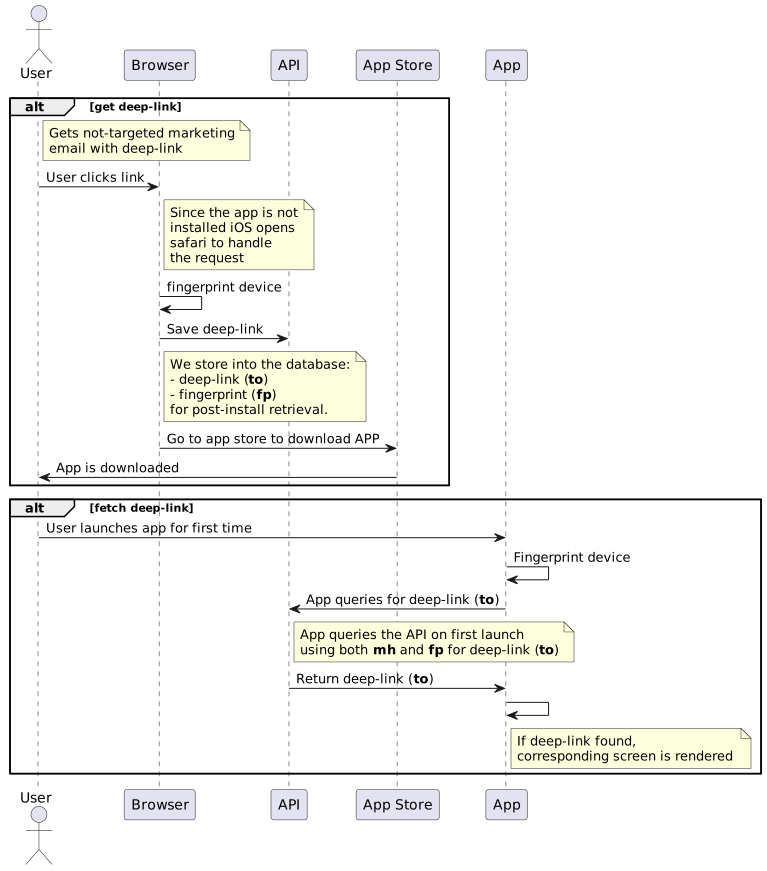
I found a service called Finger-print JS that would have worked since it can be used on web and native apps.
I built out a prototype using Finger-print JS. I was able to demo a working solution to Alex using a deep-link-api backend written in golang and SQLite along with the corresponding web front end.
-
Member hash
We were very concerned that Apple would not approve an app using the finger-print method. I proposed that we use the essence of the finger-print solution but instead of finger-printing we would “target” the deep-links by encrypting the member id’s using a hash. The user flow would be similar to the fingerprinting solution.
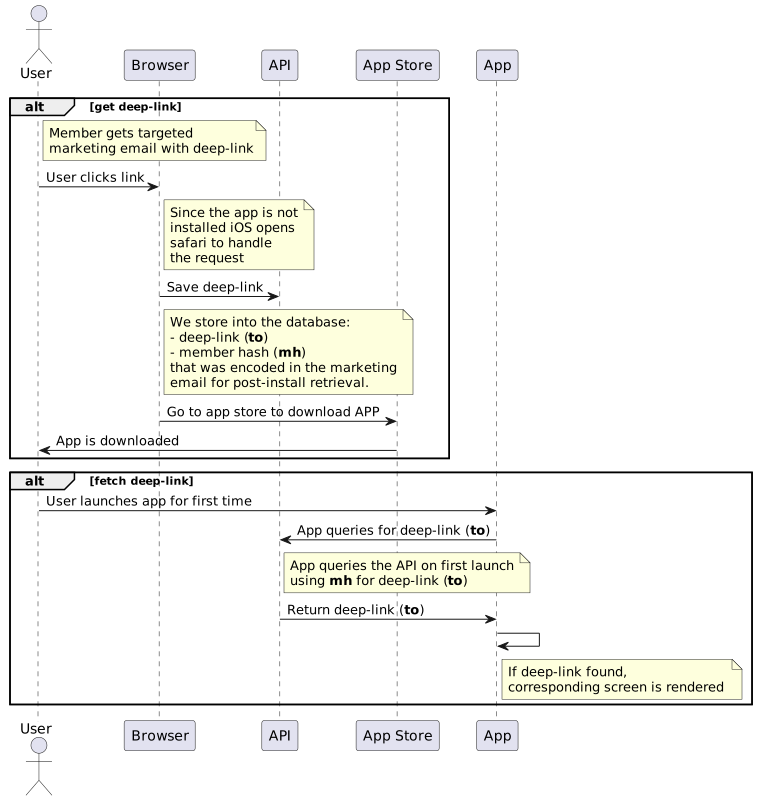
This solution was more palatable since we would not be trying to uniquely identify each iOS device. There was a big draw-back. A malicious actor could capture the link with the encrypted member id. With time, they could crack the encryption. This would allow them to figure out the member id and the associated medical resource. This was to close to a potential HIPAA violation for us.
-
Apple Smart Banner
While doing research on deferred deep-linking solutions I came across an article that mentioned Apple’s Smart Banner. This would have been a great solution since it would have allowed us to avoid building a back-end service altogether. It also seems to be Apple’s preferred way of handling deferred deep-linking.
I did find two issues with Apple’s Smart Banners that made it not a viable solution for us.
First, the smart banner only works with mobile Safari for iOS. If the user’s default browser is not Safari for iOS, the smart banner would not show at all.
Second, once dismissed, the smart banner will not re-appear easily. This happened to me during testing. I accidentally dismissed the banner. No matter how hard I tried I could not predictably reset the device so that the banner would re-appear.
-
Copy to clipboard
We were aware that some deep-linking solutions use the device clipboard as the mechanism to pass deep-link information to the app after the installation. We decided against this solution since it felt hacky. Also, Apple could change how the clipboard worked at any time breaking deferred deep-linking.
On a whim, we looked at how Firebase’s dynamic links worked under the hood. We discovered that Firebase used the browser clipboard API. They however used the older and deprecated execCommand API to write to the clipboard.
Creating a prototype using the newer Clipboard API was straight forward.
This turned out to be the simplest of the 4 solutions and the one closest to what Firebase’s dynamic links.
Conclusion
After evaluating and trying all 4 solutions we decided to go with the clipboard solution. It was the simplest to implement and maintain. It also did not require any back-end service. In the event that Apple changes how the clipboard works, we could quickly pivot to solution 1 or 2 since we already had prototypes for both.
I am appreciative that Alex came to me with this interesting problem. It was a fun adventure exploring different solutions. Although solutions 1 and 2 were not used, I learned a lot about making a simple service in golang echo.